Airmate download manager problems

Joined
Nov 11, 2021
Messages
85
Anyone else having issues with the airmate download manager? I had it on my windows 10 pro for 9 months and no problems. Then tried to update one month, tried to launch the app and I get a white box with a spinning cursor. Have to force close the app. Installed on my other office computer, and worked great that month. Then it worked on the original computer. Now it wont work on either one. On the second computer Ill actually be able to log in, but after login the screen freezes and have to force close as well.
 
Nothing like that on my Mac so far update last weekend I think no problems
 
Every third or fourth launch I have to delete the airmate download manager and re-install in order to get it to work.

Running a Mac with the latest updates.
 
Trouble-free on my MacBook Pro (intel) with current updates. That is the opposite I have to say about the Airmate app on my iPad mini, which is almost unusable :-(
 
A huge source of frustration with every update. Takes forever and fails to complete usually. Haven't found a fix.
 
I use an M1 MacBook Pro and haven’t had a problem with it completing but it does take quite a long time to download and then write to the USB. I’ve upgraded my USB sticks to a faster version to those supplied by Dynon with the screens which helps speed things up a bit. The time taken to complete the update is compounded by having to download the subscription Airfield Plates separately from the AirMate utility which is a faff and then writing those to the sticks too. Apparently this will be incorporated in a future release but it’s been a while since they announced that.
 
I use an M1 MacBook Pro and haven’t had a problem with it completing but it does take quite a long time to download and then write to the USB. I’ve upgraded my USB sticks to a faster version to those supplied by Dynon with the screens which helps speed things up a bit. The time taken to complete the update is compounded by having to download the subscription Airfield Plates separately from the AirMate utility which is a faff and then writing those to the sticks too. Apparently this will be incorporated in a future release but it’s been a while since they announced that.
Curious what USB stick you went with. I've been looking for a faster one that is still small like Dynons. I have discovered that the 32 GB limit seems to not be true as long as the drive is FAT32 so that opens up a lot more possibility as trying to find a 32 GB card these days is harder especially a nice small one.
 
...I wondered whether you could buy a larger capacity and format to FAT32 but didn't try it myself.
Yes, you can. FAT32 has size limitations, but it is not a 32 GB size limitation for the drive itself. 32 is the number of bits used to used for identifying data clusters on the drive. You can format much larger drive partitions to FAT32, up into the TB range. The only limitations it might have is that files cannot be larger than 4 GB, and there's no inherent file security. That doesn't affect your Dynon system. I'd recommend getting a third party formatting utility, since Windows and iOS sometimes have problems formatting large FAT32 partitions.
 
Hi,

I tried these first https://www.amazon.co.uk/dp/B015CH1JIW?ref_=ppx_hzsearch_conn_dt_b_fed_asin_title_5&th=1 but I found they got incredibly hot when writing files so returned them.

So I tried these https://www.amazon.co.uk/dp/B08KHTRF61?ref_=ppx_hzsearch_conn_dt_b_fed_asin_title_3&th=1 and found them to be very good with fast write times.

I wondered whether you could buy a larger capacity and format to FAT32 but didn't try it myself.
Hmm that's nice with it not being hot but it would be nice to try and find something more flat as it sticks out on the front of my panel
 
That's about as flat as USB drives come.
What was meant was flat as not protruding from the panel, you could call it short. The two url's point to USB sticks that extend a lot from the panel and might leave a nasty dent in the pilot if he/she ever got slammed against the panel
 
Yes, I know. Whatever dimension you want to reference, that's pretty much the standard size for USB drives. There may be some shorter, thinner, skinnier, whatever, but they're still going to stick out close to the same amount. I personally would reorient the connector, or just use a pigtail connector, because I've seen this problem many times. But I'm a career electronics geek, and I know not everyone wants to do those things. To some degree, almost everything in an airplane is a compromise of sorts.
 
Cool. Good find. I'd still go with a pigtail, but I'm a stubborn cuss.
 
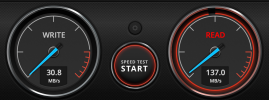
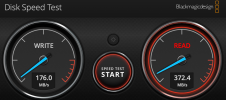
Thought I would share what I ended up going with this https://www.amazon.com/dp/B0BY2WH7QB?ref=ppx_yo2ov_dt_b_fed_asin_title&th=1. I did some benchmarks and am quite impressed. The existing is the included Dynon USB stick. New is the new drive. It does get warm although the existing Dynon one does as well. Usually if a USB stick is getting too hot it will give good performance at first and then degrade in performance after some time. So far from testing around an hour it seems pretty steady and is almost six times faster write.
 

Attachments

  • Existing.png
    Existing.png
    614.7 KB · Views: 315
  • New.png
    New.png
    631.6 KB · Views: 345
Back
Top