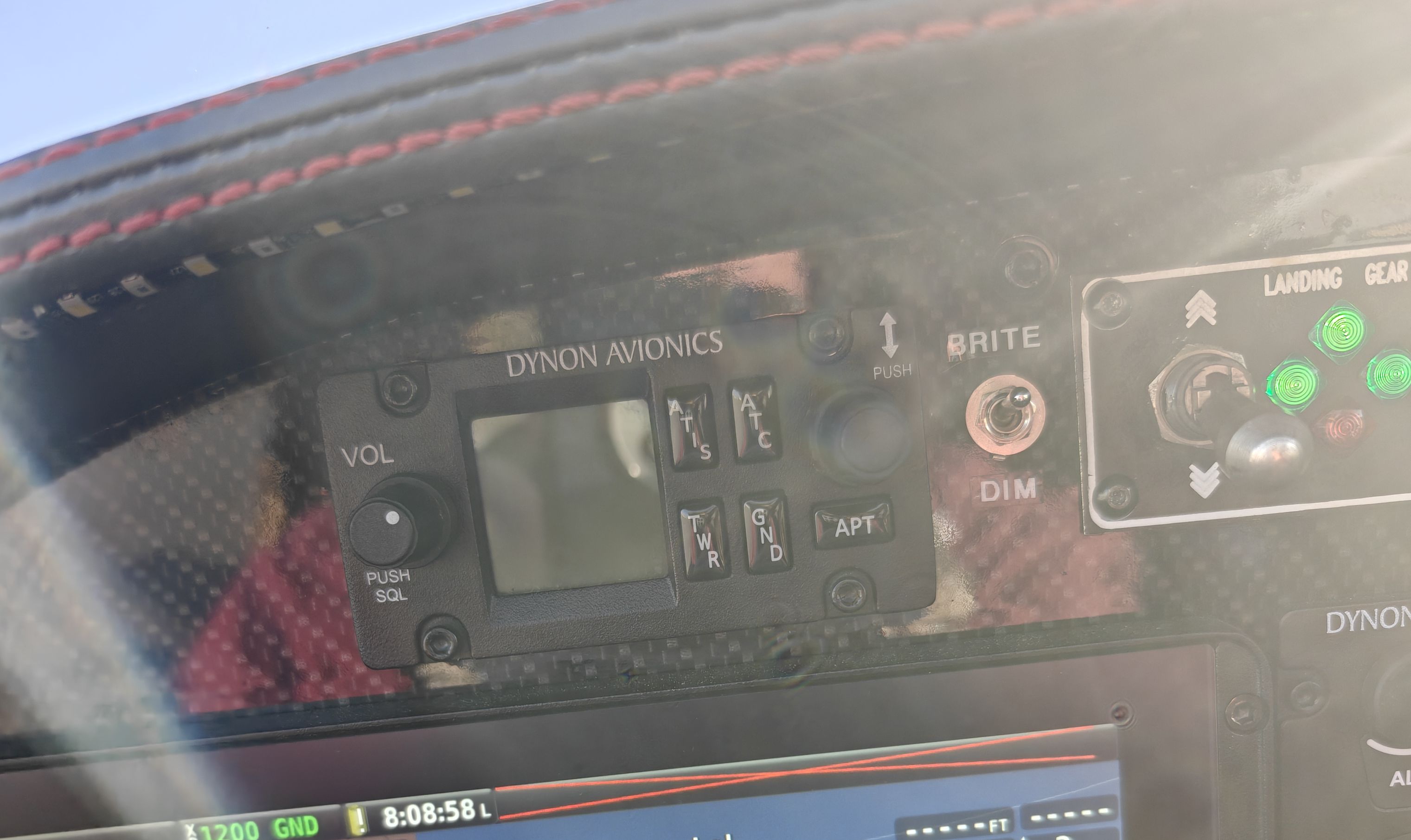
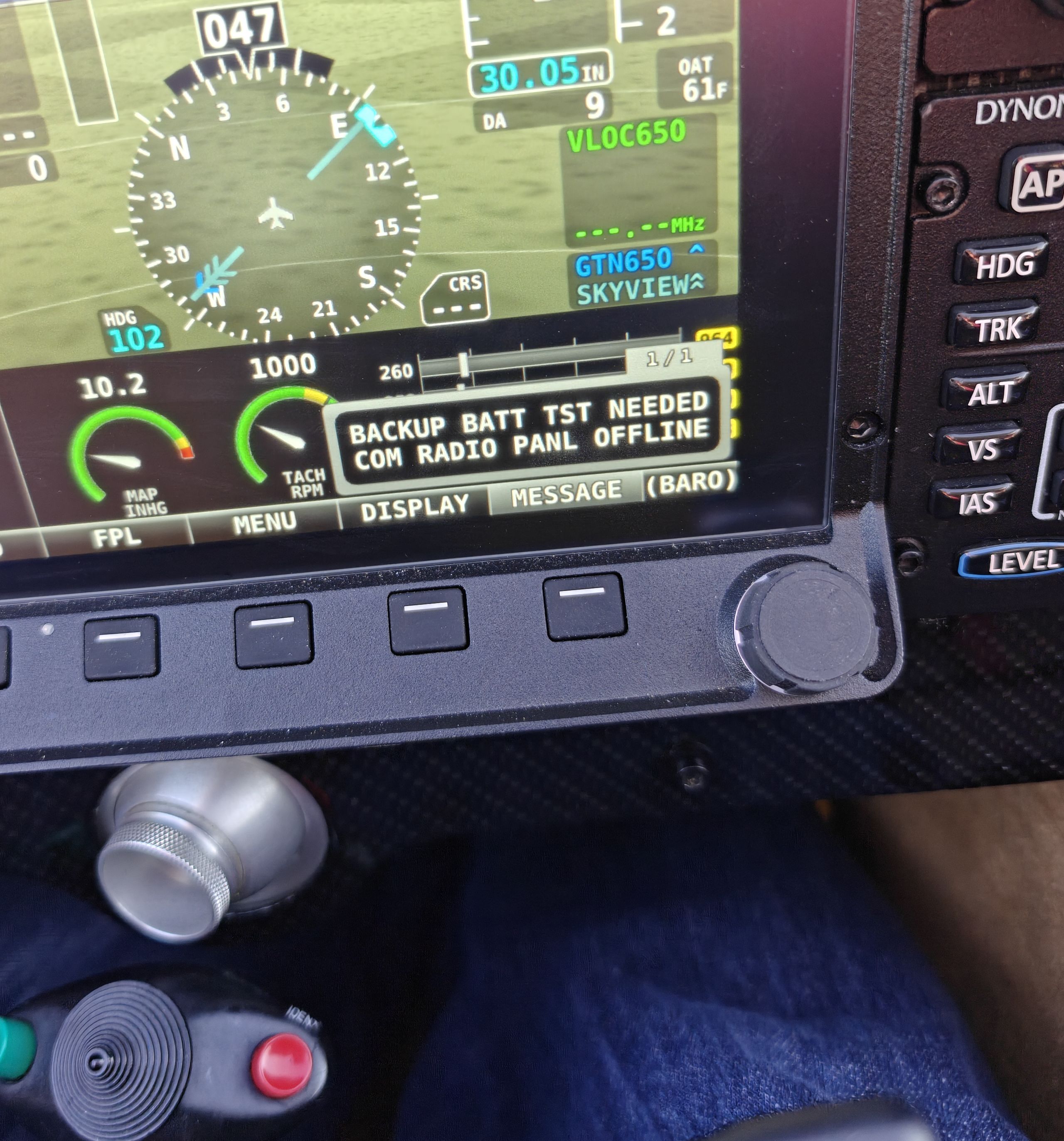
dynon com radio panel offline

FORANE

New Member
Joined
Apr 29, 2025
Messages
5
Occasionally on powering on I get the message "dynon com radio panel offline" and the com radio remains completely dark as if it wasn't powered on. When this occurs the radio remains off for the duration of the flight. When it powers on normally it remains powered on without issue for the duration of the flight. I had an electrician, 8 time RV builder, avionics installer check the installation. He assures me the wiring is good and suggests getting an RMA to send the com panel and com radio back to Dynon for evaluation because we've ruled everything else out.
Any suggestions before proceeding with that?
IMG20260423080904~2.jpg
IMG20260423080901~2.jpg
 
Last edited:

Rhino

Well-Known Member
Joined
Jul 20, 2009
Messages
1,855
Probably won't help, but just out of curiosity, what doers the network setup say when this happens?
 

jakej

Well-Known Member
Joined
Oct 10, 2007
Messages
2,256
Location
Adelaide, Australia
Yep, radiopanel is offline - no power to it as the picture shows. Power up ALL the dynon items that are in the network, then enter Setup Menu & do a system config/status check. IF you still don't see the Com then check power/grounds to it. HTH
 

FORANE

New Member
Joined
Apr 29, 2025
Messages
5
I did check the network status and everything is online. Of course the com panel didn't fail when I checked it. I tried powering it up a dozen times and it didn't fail. Hard to troubleshoot when it doesn't fail.
 

swatson999

Well-Known Member
Joined
Oct 6, 2010
Messages
1,708
This sounds a lot like what I've experienced on rare occasions with one of the peripherals such as ADS-B, XPDR, or servos. Power cycling the aircraft while the main display stays on using backup battery power, everything will come on-line. It also seems to happen, IIRC, during engine start, when a lot of devices likely shut down and reboot during cranking due to the starter pulling the current down while the main display stays on using the backup battery.

My hunch is that it's a handshake or polling problem in the software...the main cpu must be doing some polling to identify devices that are "up" and ready to communicate, but it polls just a tad too quickly sometimes and one of them isn't up yet, so it marks it as failed/off-line. I've reported it to Dynon and suggested they look at the boot sequence to see if they need to add some wait states or something, but it still happens every once in a great while.

It's not wiring, and it's not power to the devices...it's a software issue, IMO.
 

FORANE

New Member
Joined
Apr 29, 2025
Messages
5
This sounds a lot like what I've experienced on rare occasions with one of the peripherals such as ADS-B, XPDR, or servos. Power cycling the aircraft while the main display stays on using backup battery power, everything will come on-line.

My hunch is that it's a handshake or polling problem in the software...the main cpu must be doing some polling to identify devices that are "up" and ready to communicate, but it polls just a tad too quickly sometimes and one of them isn't up yet, so it marks it as failed/off-line. I've reported it to Dynon and suggested they look at the boot sequence to see if they need to add some wait states or something, but it still happens every once in a great while.

It's not wiring, and it's not power to the devices...it's a software issue, IMO.
The com is one of the devices on a separate switch that I don't turn on until much after the Skyview bootup. So I could understand the com getting marked as offline, but the com-panel should still light up when power is fed to it I would think. In my case the com-panel either lights up and works or it remains off. There have been no cases where the com-panel lights up but gets marked as offline by the display.
 

Rhino

Well-Known Member
Joined
Jul 20, 2009
Messages
1,855
It's not wiring, and it's not power to the devices...
I never say that as an absolute anymore. After having been bitten in the butt with intermittent wiring issues so many times in the past, I learned never to assume that. You could hook it up on the bench and test it for power. But as @FORANE said, it's difficult to troubleshoot something that doesn't fail.
 

swatson999

Well-Known Member
Joined
Oct 6, 2010
Messages
1,708
I never say that as an absolute anymore. After having been bitten in the butt with intermittent wiring issues so many times in the past, I learned never to assume that. You could hook it up on the bench and test it for power. But as @FORANE said, it's difficult to troubleshoot something that doesn't fail.
I meant that in my case, it's not wiring. It could be in his.
I say that because it happens to different devices randomly and rarely on my system, and that means either ALL the wiring has the same problem, which is unlikely to say the least, or it's not wiring.
 

badia358

Member
Joined
Sep 14, 2011
Messages
108
Location
Mebane, NC
I meant that in my case, it's not wiring. It could be in his.
I say that because it happens to different devices randomly and rarely on my system, and that means either ALL the wiring has the same problem, which is unlikely to say the least, or it's not wiring.
Saw this same issue for the first time during a flight today. Cycled power and the radio com panel came back on. This was on my RV-10 that has been flying for over a year. I also had an RV-6A with the same radio and in 5 years, saw this same issue twice.
 
Top