Failure after software update

sstearns2

Member
Joined
Jul 2, 2007
Messages
58
Location
Camarillo, CA
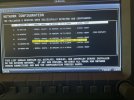
I just updated the software on my two screen skyview classic system, but I did not realize I needed to reconfigure after updating. I have not done this with previous updates and have never had an issue. While flying today I lost the transponder and eventually both screens were all red X‘s. I did the reconfigure and ended up with NETWORK CONNECTION FAULT - DATA 1 PAIR (pins 1 and 6). See photo attached.

Any advise?
Cheers,
Scott
 

Attachments

  • IMG_1230.jpeg
    IMG_1230.jpeg
    2.4 MB · Views: 65

edstepec

New Member
Joined
Nov 2, 2021
Messages
11
I just updated the software on my two screen skyview classic system, but I did not realize I needed to reconfigure after updating. I have not done this with previous updates and have never had an issue. While flying today I lost the transponder and eventually both screens were all red X‘s. I did the reconfigure and ended up with NETWORK CONNECTION FAULT - DATA 1 PAIR (pins 1 and 6). See photo attached.

Any advise?
Cheers,
Scott
Sorry no answers for you but I was just about to update as well and holding back. Keep us posted please.
 

Rhino

Well-Known Member
Joined
Jul 20, 2009
Messages
1,842
Check the wiring and connectors. Are you using a hub?
 

jakej

Well-Known Member
Joined
Oct 10, 2007
Messages
2,246
Location
Adelaide, Australia
I just updated the software on my two screen skyview classic system, but I did not realize I needed to reconfigure after updating. I have not done this with previous updates and have never had an issue. While flying today I lost the transponder and eventually both screens were all red X‘s. I did the reconfigure and ended up with NETWORK CONNECTION FAULT - DATA 1 PAIR (pins 1 and 6). See photo attached.

Any advise?
Cheers,
Scott
Do as the fault suggested - check pins 1 & 6 on the network cables. I’d start first with any network cables you made up as you may have missed making sure they locked into place 😉.
 

sstearns2

Member
Joined
Jul 2, 2007
Messages
58
Location
Camarillo, CA
I did a continuity check on the network cable connected to the problem screen. I really had to dig around in the pin holes to make contact. I’ve replaced the cable and hopefully I can fly it in the next couple days and see how it does. Ground checks are good, but the problem only manifests after 20-30 minutes of flight. The new cable was very easy to make contact with the pins. The old and new cables were sourced from Dynon.
 

jakej

Well-Known Member
Joined
Oct 10, 2007
Messages
2,246
Location
Adelaide, Australia
Ok, unless you’ve removed the backshells & THEN did a gentle pull test on the wires, you’ll never know if the old cable was the issue.
Using a DMM to test connections, just tells you the wire & connections are either good or bad, however there have been instances where the pins/sockets were not ‘locked in’ to the dsub connectors - that‘s a good reason why the ‘Pull Test’ (not too hard a pull) is universally suggested for many/most crimp connections. HTH 😉
 
Top