Bardample
I love flying!
- Joined
- Aug 18, 2013
- Messages
- 44
Can someone advise me how to set the following screen on my HDX.
I have a Monkworkz generator wired in parallel to my main Buss( as per one recommended set up per install manual
I usually have this switched on at start up , as, well as the main B and C 40 Amp Alternator switch on. After following advice to reduce the B and C alt output to 14.2 Volts , I have noticed from time to time after start up, that the B and C alt will output 14 V and say 10- 20 Amps ( I have an Earthx 680 battery) and the Monkworkz gen will output 3-5 Amps( as measured from pin 5 on the output picolock). This will drop to zero if the on off switch for the Mkwz is cycled off then on. The zero current output of zero is the default when the Mkz is on standby mode . I understand that there is no harm if the B and C alt and the Monkworkz generator both produce output, but the Monkworkz is supposed to be in the standby mode and produce output when the main alternator output drops down to battery level.
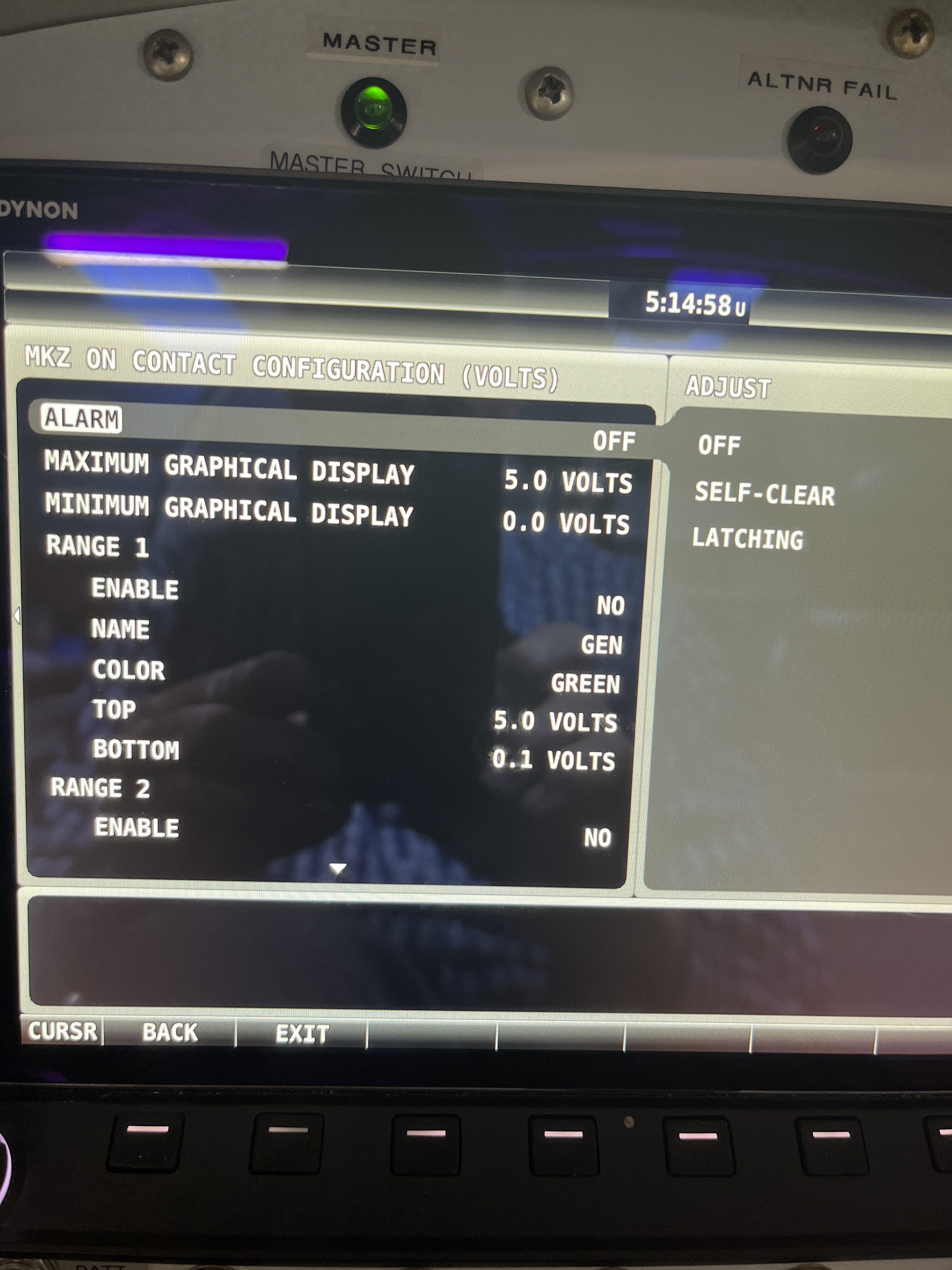
I recently wired pin 2 of the output pico lock on the Mkz to my Skyview EFIS as well, to monitor the Mkz. I wish the green light on the screen widget to only show green when the Mkz is actively producing Voltage to my buss.My setup below must be incorrect as the green light on my Skyview screen seems tobe on even when the Mkz amps output ( via the out pin 5 pico lock ) says zero.
I would appreciate what settings on the below screen are need. Thanks for any advice. Bardample
I have a Monkworkz generator wired in parallel to my main Buss( as per one recommended set up per install manual
I usually have this switched on at start up , as, well as the main B and C 40 Amp Alternator switch on. After following advice to reduce the B and C alt output to 14.2 Volts , I have noticed from time to time after start up, that the B and C alt will output 14 V and say 10- 20 Amps ( I have an Earthx 680 battery) and the Monkworkz gen will output 3-5 Amps( as measured from pin 5 on the output picolock). This will drop to zero if the on off switch for the Mkwz is cycled off then on. The zero current output of zero is the default when the Mkz is on standby mode . I understand that there is no harm if the B and C alt and the Monkworkz generator both produce output, but the Monkworkz is supposed to be in the standby mode and produce output when the main alternator output drops down to battery level.
I recently wired pin 2 of the output pico lock on the Mkz to my Skyview EFIS as well, to monitor the Mkz. I wish the green light on the screen widget to only show green when the Mkz is actively producing Voltage to my buss.My setup below must be incorrect as the green light on my Skyview screen seems tobe on even when the Mkz amps output ( via the out pin 5 pico lock ) says zero.
I would appreciate what settings on the below screen are need. Thanks for any advice. Bardample