
Tie Flight Plan SRC to HSI NAV SRC

andresmith76

I love flying!
Joined
Oct 4, 2018
Messages
184
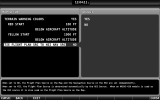
I have a question about this option found in the Setup Menu > Map Setup screen (see attached). If I've loaded and enabled a flight plan using the Skyview Flight Plan menu, how does this option change Skyview's behavior when switching from No (default) to Yes? Other than the note at the bottom of the setup screen image, I can find no information about this option in either the Installation or Pilot Users guides?
 

Attachments

  • 7-Map Setup-Terrain Warning Colors-Tie Flight Plan SRC to HSI NAV SRC.png
    7-Map Setup-Terrain Warning Colors-Tie Flight Plan SRC to HSI NAV SRC.png
    126 KB · Views: 436
The 'yes' option becomes useful when you install an IFR navigator. After the install, the situation exists that one flight plan can be loaded in SkyView while a different one can be loaded in your IFR GPS. I believe toggling to yes ensures that the flight plan you choose to display on your map is also the flight plan driving your HSI.
 
If I do not have an external navigator, does changing from No to Yes have any effect/make a difference?
 
If you do not have more than one flight plan source to choose from, I don’t think it would make a difference whether it was selected or not. As canardmulti indicated, it’s great when you have multiple options. With yes selected, when you change the HSI source, the flight plan source changes with it.
 
I also was confused by this. I set it to "Yes", but was surprised when I went to Flight plan menu and could not switch the Nav source from the external GPS navigator, (I have a Garmin GPS 175), to the Dynon Skyview GPS.
When I switched the CDI source back and forth, the Flight Plan Source followed and stayed in Synch, but not the other way around.
 
Section 12 of the Installation Manual, and section 7 of the User's Manual. Both added in April 2019.
 
Neither if those references clearly state which Nav sources this option works with. Using the phrases INPUT 1 & INPUT 2 confuses the issue because it can be read to mean that only Nav sources feeding data thriugh the same ARINC-429 will be affected by this setting, i.e., that switching the Flight plan from an external GPS to a Skyview Flight plan will not cause the CDI source to switch.. which is what i experienced.
 
I also was confused by this. I set it to "Yes", but was surprised when I went to Flight plan menu and could not switch the Nav source from the external GPS navigator, (I have a Garmin GPS 175), to the Dynon Skyview GPS.
When I switched the CDI source back and forth, the Flight Plan Source followed and stayed in Synch, but not the other way around.
Clicking between the flight plan pages does not select that page as a source. While on the page, you have to select the Navigate button to activate that flight plan as the current source. HSI should switch with it in your current configuration.
 
Tried this again yesterday. Entered a simple flight plan on GPS 175, Then went to flight plan menu. The flight plan was shown there, and I could select it, but there was no navigate option on soft keys.
 
What software version are you running? What keys does it show in your Flight Plan menu (do you have a screen shot)?
 
The Navigate soft key will come up under the Autopilot> Roll> Navigate. It does no show on the Flight Plan menu.
 
I will check that. I confess that I did not put in a complete flight plan with 2 waypoints, I just entered a Direct To a destination airport, and activated it. It did show in the flight plan menu on the HDX scren, (as a separate tab labeled GPS 175 ). I will check again, and get a screen shot.
 
Last edited:
I am following this thread very carefully,I have HDX 1100 and a gps 175 and AP installed on my plane with jeppesen data,but it does not start the descent when it corresponds in an RNAV, in the hdx I put gps2 source and I can see the flight plan, any suggestions?
 
Back
Top