DATABASE NO LONGER CURRENT... When it is!

Karl Gosling

New Member
Joined
Sep 12, 2024
Messages
16
Hi all, I get the above message when starting my Skyview HDX even though the database is indeed current (a few days old at the time of writing).

The AC was grounded awaiting maintenance for 6 months (May 2025) and now it's good to fly I'm having this issue.
I am on the latest firmware but the problem was there before the update, I was hoping the new FW would solve the issue but no.
Any ideas?

Thanks,
Karl
 

Attachments

  • 20251202_171041.JPG
    20251202_171041.JPG
    3.5 MB · Views: 53
  • 20251202_171116.JPG
    20251202_171116.JPG
    1.6 MB · Views: 50

swatson999

Well-Known Member
Joined
Oct 6, 2010
Messages
1,694
Does the .dup file from Dynon include PocketFMS charts for you? Because that's what it's saying is out of date, not the Dynon data.
 

Karl Gosling

New Member
Joined
Sep 12, 2024
Messages
16
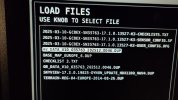
The .dup files (PocketFMS files) are a subscription from EasyVFR and the two files you see there are current (AV_DATA and OB_DATA), literally less than a week old.
It's like it's stuck on the May charts even though (as you can see) I've updated to the current ones, this is done every 28 days and I've never had a problem before... but then I've never had a 6 month gap between updates so maybe this is causing some sort of issue?!
 
Last edited:

Rhino

Well-Known Member
Joined
Jul 20, 2009
Messages
1,757
Try updating your terrain database. Users outside the US must have a current terrain database installed. Yours is 11 years old, so that might be the problem.
 

Karl Gosling

New Member
Joined
Sep 12, 2024
Messages
16
Try updating your terrain database. Users outside the US must have a current terrain database installed. Yours is 11 years old, so that might be the problem.
The terrain DB is up to date, thats supplied by Dynon and is as current as it gets if you want to take a look - https://dynonavionics.com/basemap-terrain-data.php
The error specifically says my charts are from 15th May 2025, this was close to the last time I flew before it was parked up for maintenance, I think leaving a gap of 6 months between updates as caused some issue?!
 

Stevec

Active Member
Joined
Jun 24, 2020
Messages
167
The terrain databases have not been updated for years but are still current. The check is looking at the obs, nav database and by the wording the charts. Does removing the USB make the problem go away?. I have had issues with my chart provider in the past where they had coded an incorrect currency date in the database.
 

jaba-who

Member
Joined
Feb 23, 2007
Messages
134
Location
Cairns, Australia
Same problem ( but maybe different)

I’ve just had to reinstall a repaired older HDX 1100 Screen.
It now also says ”No Hi Res Terrain”
But when I look for it ( if I can find it since I can’t remember how to find the list 🤣😂) it says it is there. It’s an old version ( maybe 2014) but it’s there.

my complicating factor is I’m in Australia and I’m also running Ozrunways in the Dynon so I’m not absolutely sure whether the terrain data bases required are the Dynon version or there’s one embedded in the Ozrunways databases that I’ve down loaded.

To complicate the issue I tried to download the Dynon Hi Res data from this website but it won’t download and says there’s an error and it has been discontinued. the low resolution ones are still downloadable so I’m thinking theres an error rather than truly discontinued service.
 

jaba-who

Member
Joined
Feb 23, 2007
Messages
134
Location
Cairns, Australia
Try updating your terrain database. Users outside the US must have a current terrain database installed. Yours is 11 years old, so that might be the problem.
Not sure that’s entirely true.
Until yesterday my System worked fine in Australia on the old Hi Res database.
Today after installing a new HDX ( well a repaired old one) and reloading all the updates etc it now gives a “ No Hi Res Terrain” warning but as of yesterday it worked fine On the old one from about 2014.
 

jaba-who

Member
Joined
Feb 23, 2007
Messages
134
Location
Cairns, Australia
Same problem ( but maybe different)

I’ve just had to reinstall a repaired older HDX 1100 Screen.
It now also says ”No Hi Res Terrain”
But when I look for it ( if I can find it since I can’t remember how to find the list 🤣😂) it says it is there. It’s an old version ( maybe 2014) but it’s there.

my complicating factor is I’m in Australia and I’m also running Ozrunways in the Dynon so I’m not absolutely sure whether the terrain data bases required are the Dynon version or there’s one embedded in the Ozrunways databases that I’ve down loaded.

To complicate the issue I tried to download the Dynon Hi Res data from this website but it won’t download and says there’s an error and it has been discontinued. the low resolution ones are still downloadable so I’m thinking theres an error rather than truly discontinued service.
Follow up
got a very quick response from Oz Runways.
they advise that they Don’t include any terrain data in their updates or files.
so it comes back to Dynon.
 

Stevec

Active Member
Joined
Jun 24, 2020
Messages
167
If it was repaired by Dynon and they wiped the databases you will need to download and install the terrain databases. Usually they come back with update instructions. The one you are missing is the hi res South Pacific database, I think it’s called. Look on the Dynon site and it is there. Yes they have not been updated since 2014 but they are the current ones. Ozrunways only do the nav database file.
 

Rhino

Well-Known Member
Joined
Jul 20, 2009
Messages
1,757
Not sure that’s entirely true.
Until yesterday my System worked fine in Australia on the old Hi Res database.
Today after installing a new HDX ( well a repaired old one) and reloading all the updates etc it now gives a “ No Hi Res Terrain” warning but as of yesterday it worked fine On the old one from about 2014.
The manual says that for non-US databases. But unfortunately it doesn't specify how old is too old. Thought it might be worth a shot.
 

jaba-who

Member
Joined
Feb 23, 2007
Messages
134
Location
Cairns, Australia
The manual says that for non-US databases. But unfortunately it doesn't specify how old is too old. Thought it might be worth a shot.
Yes I agree and that’s the path I thought too.
but as my luck usually works the Dynon page now doesn’t work and the data files needed to do the restore are no longer available. Every world site on the hi res page returns an error basically saying the files have been discontinued.
Funny thing is all the base map and low res files still work.
 

jaba-who

Member
Joined
Feb 23, 2007
Messages
134
Location
Cairns, Australia
If it was repaired by Dynon and they wiped the databases you will need to download and install the terrain databases. Usually they come back with update instructions. The one you are missing is the hi res South Pacific database, I think it’s called. Look on the Dynon site and it is there. Yes they have not been updated since 2014 but they are the current ones. Ozrunways only do the nav database file.
Yes it’s there but all the files ( for all areas) returning an error.
 
Top